Gaussian Blur
Granular reverb plugin
Gaussian Blur is a granular reverb plugin. You control how the granular processor samples the incoming audio, and shape when the reverb swells in. A plate-style tail carries it out. Go from blurring vocals into slow swells, to smearing guitar chords into ambient pads.
Testimonials
- “Yeah, this thing is real f**kin’ cool, man…it’s pretty epic.” - P0rfiry, experimental modular musician
- “Love it! Jammed the entire morning with it on different instruments. Very easy to use and you get a lot of amazing sounds out of it.” - LoopNoiseBeat, live looping musician
Granular bloom into a plate-style tail
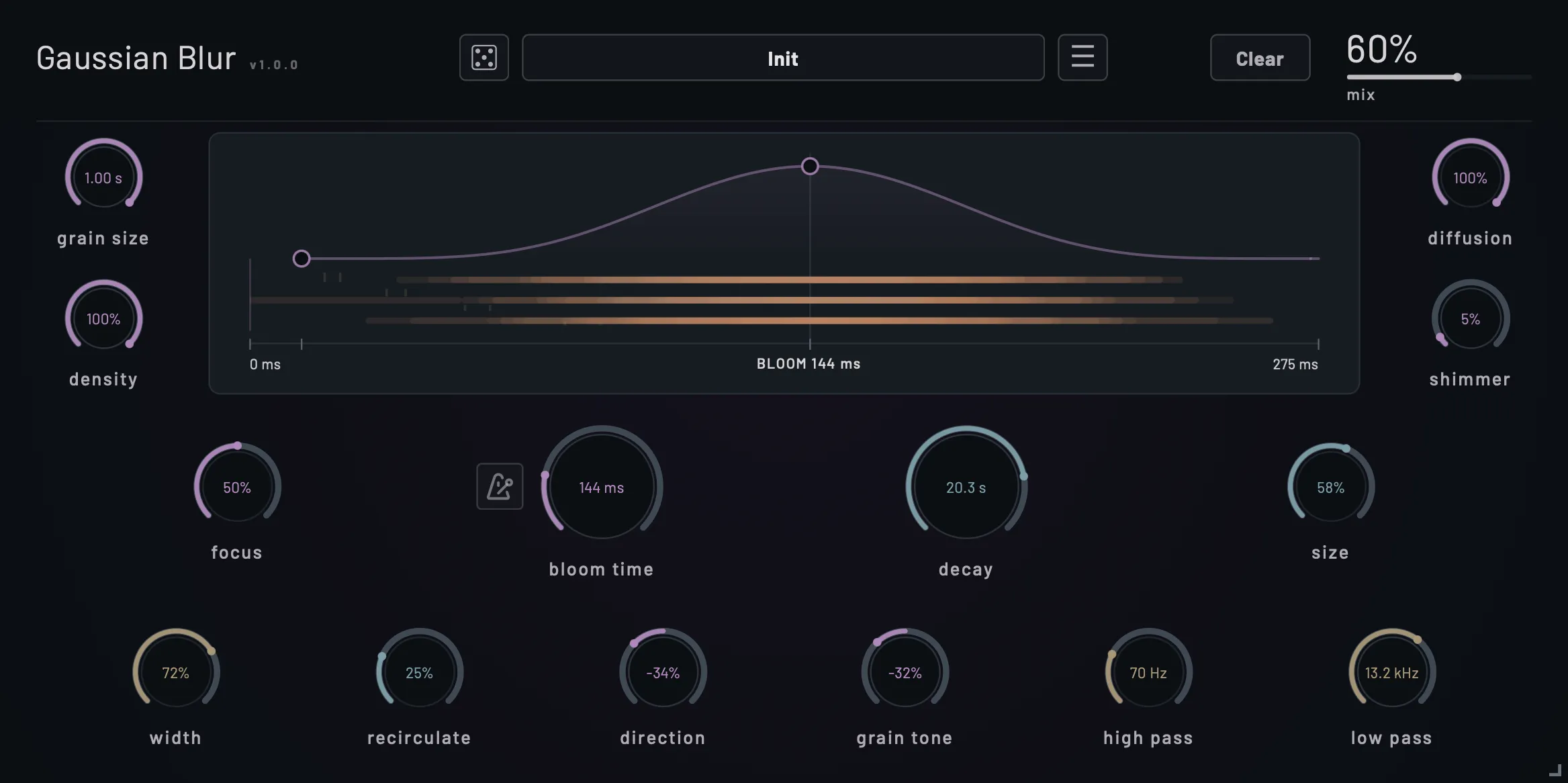
Gaussian Blur breaks incoming audio into overlapping fragments and feeds them into a plate-style reverb tail. You control how long those fragments are, when they play, how much they blend together, and how long they ring out.
Control when the reverb builds
The bloom curve lets you spread the grains out over time or concentrate them around a particular moment. Drag the curve to move that concentration earlier or later. This changes how the reverb builds after a sound, so you can have it respond right away or swell seconds later.
- Bloom time from 20 milliseconds to 5 seconds
- Tempo sync, including dotted and triplet divisions
- Up to 40 seconds of decay, even a short pluck can turn into a supermassive rift
Change the grains
Short grains break up the source into small pieces. Longer grains preserve more of the original phrase. Let them diffuse and overlap into weird, alien spaces.
- Grain Size: 20 milliseconds to 1 second
- Direction: blend forward and reversed grains for reverse reverb swells
- Shimmer: shift a proportion of the grains up an octave, or fifths and octaves
- Grain Tone: adjust brightness before the grains enter the reverb tail
Made for
- Ambient and cinematic pads from any source
- Vocal throws and reverse reverb swells
- Guitar and synth textures for shoegaze and post-rock
- Sound design accents and transitions
- It’s routinely used in our own live ambient and electronic music streams
Try it free
Create a free account to download the 14-day trial for macOS, Linux, or Windows.
Manual
Read the Gaussian Blur user manual for a full guide to every control.
System requirements
- macOS 14+ (Intel, Apple Silicon)
- Linux: x86_64, glibc 2.39+ (e.g. Ubuntu 24.04+, Fedora 40+, Debian 13+, Arch). Requires an X11 session or Wayland with XWayland.
- Windows 10+ (Intel x86_64)
- iOS 18.6+ (iPad and iPhone AUv3)
- 64-bit VST3 host, or an Audio Unit host on macOS